Shuto is what I’ve been working on: traffic that feels more natural, a map to help me get somewhere, repair and refuel for when things go poorly, and an AI companion to talk to along the way. It all lives inside Assetto Corsa. I’m asking a dollar for it.
ONE-TIME PURCHASE$1 · Existing buyers keep their key
THE CORE APP
Here’s what I’ve put in it.
MAP
Choose a destination.
I like having somewhere to go, even when the entire point is getting there. Pick a supported Shutoko landmark and follow the road guidance. You can pan around, zoom in, or let the map follow your car.
Navigation targets Shutoko Revival Project 0.9.4 PTB1. Some routes and final approaches are unavailable.
PIT CREW
Repair and refuel in place.
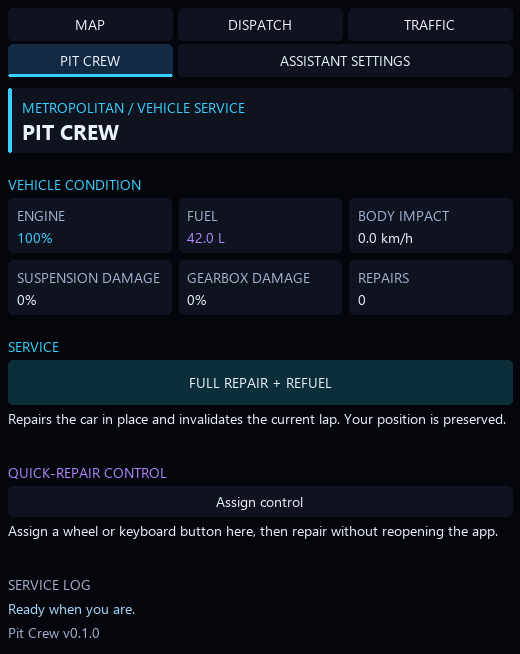
Sometimes the drive goes well. Sometimes there’s a barrier. I’ve built repair and refuel into the Pit Crew tab so you can restore the car in place and keep going. You can also bind quick repairs to a wheel or keyboard button.
Offline only. Disabled during replays. Repairs invalidate the current lap.
ASSISTANT SETTINGS
Bring a driving companion.
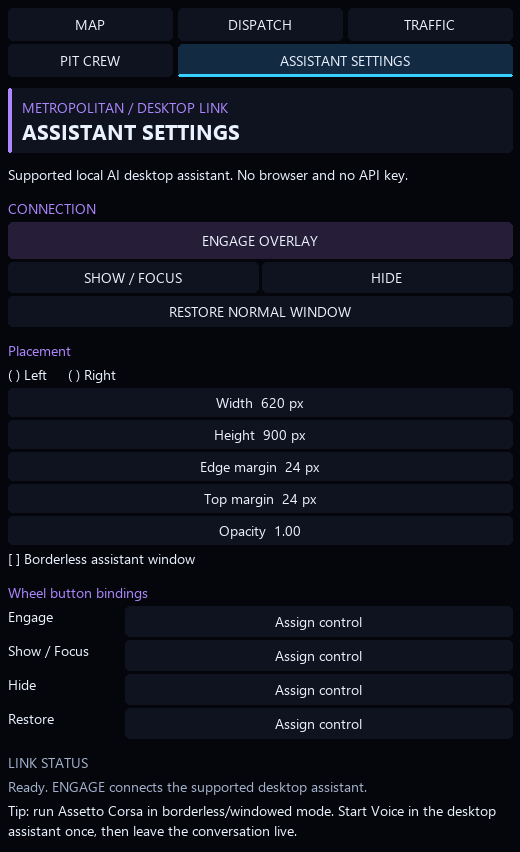
I also wanted to talk to the car. Naturally. Connect your desktop AI companion and ask how the tires are holding up, whether you’ve got fuel for another run, or where to head next. It can answer using information from your drive. Set the overlay where you want it and assign the controls to your wheel.
The AI client and account access are separate. Voice runs in the desktop client.
TRAFFIC
A better flow to the road.
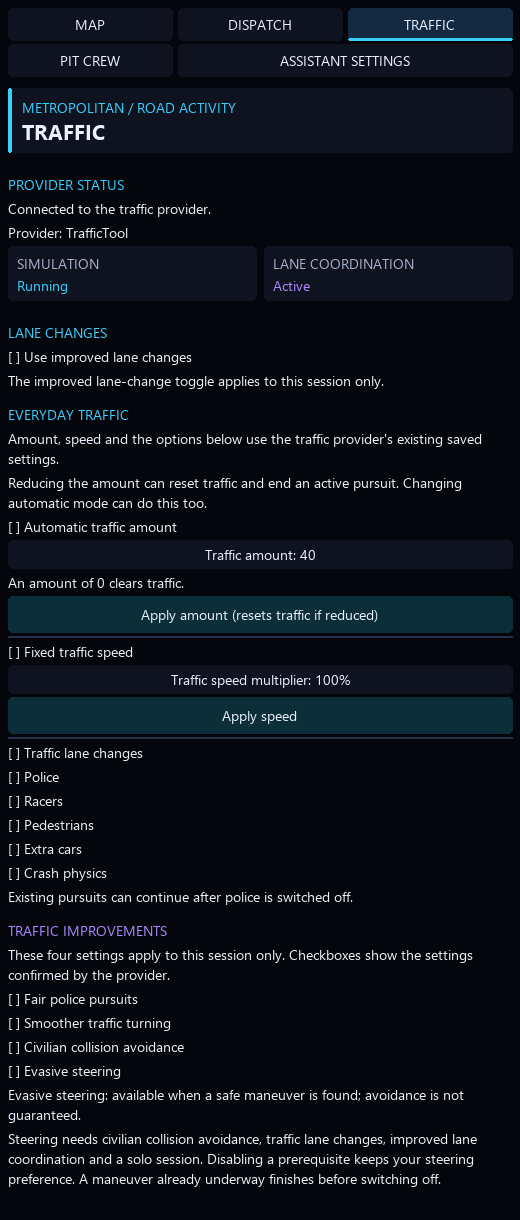
This is where a lot of my work has gone: getting cars to merge earlier, coordinate lane changes and react to you, while giving police pursuits a fairer set of rules. Density, speed and behavior controls are together in the Traffic tab.
I’ve kept a compact mode for when you just want to drive. ROLL UP leaves an animated light strip; EXPAND brings the controls back. You can use the map and in-game controls without talking to an AI. It can have a quiet evening too.
SHUTO / SHUTOKO / 2REAL
What Shuto adds to the drive.
Shutoko supplies the roads. 2REAL already supplies traffic, police, helicopters, lane changes, headlight reactions and racing progression. Shuto adds destination navigation, companion tools, repair and refuel, and selected traffic improvements.
NAVIGATION + COPILOT
A destination and someone along for the ride.
83 visible destinations, a dropdown and an expanded map with mouse controls.
Bidirectional GPS with maneuver distances, turnaround cues and arrival guidance.
Driving snapshots and supported route commands for a separate desktop assistant.
TRAFFIC CHANGES
Specific changes to an existing system.
Local lane reservations and earlier expressway merge planning.
Predictive civilian braking and conditional evasive steering.
Fair-pursuit controls, nearby heading updates and targeted cleanup protection.
PIT CREW + CONTROLS
Keep the drive going.
Built-in repair and refuel for offline driving.
A repair action you can bind to your wheel or keyboard.
Map, traffic and assistant settings together in one app.
Pit Crew is disabled during replays. Repairs invalidate the current lap.
Included in rc14: the expanded destination catalog, map controls, bidirectional GPS, fuel-only adjustment and shared tab styling. Automatic Home spawning, police vehicle profiles and newer evasion/collision experiments remain local. The traffic patch is experimental; automated checks do not establish driving quality.
DESIGN PREVIEW
Here’s what it looks like.
Interface previews. I’ve used simulated layouts and example values here to show the tabs clearly.
First, credit where it belongs: the 2REAL TrafficTool creators have already done excellent work. Shuto builds on that. I’m standing on the shoulders of giants here, and I’ve worked hard on adjustments that I think make an already great foundation much more enjoyable in single-player.
A truck turning smoothly. A car making space at a merge. Oncoming traffic continuing to exist after it passes you. Small stuff, until you’re driving through it. I’ve spent time working through these details on the road, and together they make Shutoko feel more natural and consistent to me. Here’s what I’ve changed.
MERGING
A little planning before the merge.
I’ve adjusted eligible expressway merges to look for a gap earlier and ease approaching traffic speeds to make room. Cars can keep rolling when there’s space, with clearance checks ahead and behind. If the gap is blocked, they still wait. There’s only so much road.
LANE CHANGES
One gap, one car at a time.
I’ve added coordination around the space each lane change actually needs. Cars on different stretches can change lanes at the same time; cars trying to occupy the same gap take turns. That keeps one maneuver from holding up an entire stretch of highway.
POLICE PURSUITS
I’d like to earn the escape.
I’ve removed the player-speed matching and distance-based catch-up boosts from lane-following police behavior. Police use their own vehicle performance and configured limits. I want the chase to come down to the driving and the cars involved. If I get caught, I’d prefer to have earned that too.
VEHICLE MOTION
Smoother turns, especially for trucks.
Long trucks make little jumps in rotation very obvious. I’ve extended full-rate heading updates from 40 to 200 metres to target stepping through nearby corners. That is a specific update-frequency change; it does not promise that every stutter is fixed.
CIVILIAN REACTIONS
Give the other driver a chance.
I’ve given civilian drivers a braking response that anticipates a conflict with your car. With enough time and a suitable adjacent lane, they can also check for cars and barriers and steer out of the way. If there’s nowhere to go, they brake. They’re trying. Sometimes you’re arriving rather quickly.
TRAFFIC CONTINUITY
The car should still be there.
I’ve changed cleanup rules to protect nearby or visible cars, including oncoming traffic just after it passes you. A car that’s still slowing down is no longer counted as stationary for cleanup. I find the world considerably more convincing when its occupants don’t disappear mid-drive.
And yes, you can adjust it.
I’ve brought the controls into Shuto’s Traffic tab: traffic amount or automatic density, fixed speed or a multiplier, lane changes, police, racers, pedestrians and crash settings. The improvements have their own switches, so you can tune the drive to suit you.
All of this is part of Shuto. Pick a destination, bring a companion, or drive around with no particular plan.
Check your TrafficTool setup.
My patch needs a separately installed, compatible 2REAL TrafficTool 2.1.1 source build. If traffic is what you’re buying it for, run the free checker first. It checks the actual source files; the version number alone isn’t enough. You’ll need to obtain TrafficTool and its vehicles and assets separately.
I use Gumroad for checkout. Shuto is $1. Use the key from your purchase on the download page below. If you already have a key, keep using it. You don’t need to buy it again.
MAIN APP / 0.3.0-rc17
Shuto · $1
Traffic improvements, map and navigation, built-in repair and refuel, and the desktop-assistant connection.
Python 3.11 or newer, available in PowerShell as python.exe
The installer checks for Python even if you only want the in-game controls. You’ll need the game, map and supporting software installed separately.
For the assistant connection
A compatible Codex desktop client with plugin support, an eligible signed-in account, and codex.exe available in PowerShell.
The dollar covers Shuto; AI service access is separate. If you want to talk while driving, start voice in your desktop client.
Download and extract the whole ZIP.
Close Assetto Corsa. Use your Gumroad key on the Shuto download page and extract the entire package.
Run the installer.
Open PowerShell as Administrator in the extracted folder. For the core app, run:
Set-ExecutionPolicy -Scope Process Bypass
.\Install-Metropolitan.ps1
For traffic, run the compatibility checker first, then follow the combined installation guide. Keep the installer’s backups.
Open Shuto in the game.
Enable the Lua app in Content Manager, start single-player Practice on the supported Shutoko map, and open Shuto from the app sidebar. Choose a destination in Map. For the assistant connection, open a new Codex task after installation.
No. I’ve built it into Shuto 0.3.0-rc17. Open the Pit Crew tab to repair and refuel. It works offline, is disabled during replays, and invalidates the current lap when used.
What do the interface previews show?
They’re simulated layouts of the Pit Crew, Assistant Settings and Traffic tabs, with example values so you can see what’s where. Rc14 includes this shared styling; the illustrations predate its new map controls and fuel-only setting. In-game visual validation remains pending.
Is this a subscription?
No. It’s a dollar, once. Your desktop AI client has its own account and service requirements, which aren’t included in that dollar.
Does the assistant automatically call every turn?
The in-game map gives you route guidance directly. The assistant reads driving information when it requests a snapshot. I’m not promising continuous monitoring or an automatic voice callout for every turn.
What should I check before upgrading?
Start with the release notes and the guide for your installed version. The traffic installer rejects unknown source edits, so a customized setup may need a different upgrade approach. Keep the backups. I put them there for a reason.